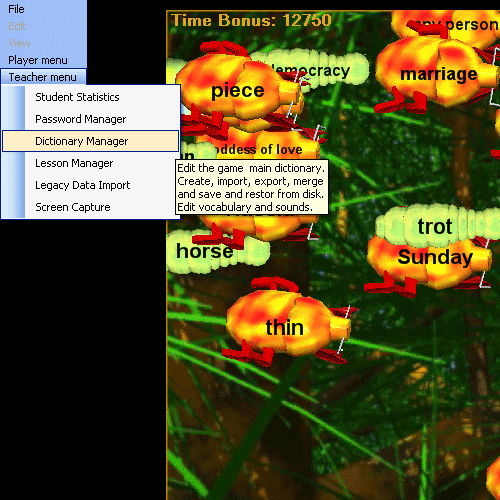
The Hungry Frog French Teacher Menu Dictionary Manager is where you create and edit dictionaries (most examples are for the french dictionary) from which you create your French study lessons as a French teacher or French homeschooler. You also uses the manager to import and export dictionaries to and from disk, and to manage sound files which are spoken by frogs which aid in learning proper French pronunciation of the French words in your French study list.
Teacher Menu | Dictionary Manager
Clicking on the Hungry Frog French Teacher Menu Dictionary Manager menu item brings up the Dictionary Manager.
Example screen Capture: Hungry Frog French Teacher Menu, French Dictionary Manager:
There are three main group boxes on the Hungry Frog French Teacher Menu Dictionary Manager Screen.
'Dictionary' box - shows the words in the currently used dictionary and the 'Delete' control button.
'Create / Edit Dictionary Item' box - shows the English definitions and spoken sound file information for the selected word or new defn.
'File Access' box - shows controls for saving, opeening, merging and restoring language dictionaries.
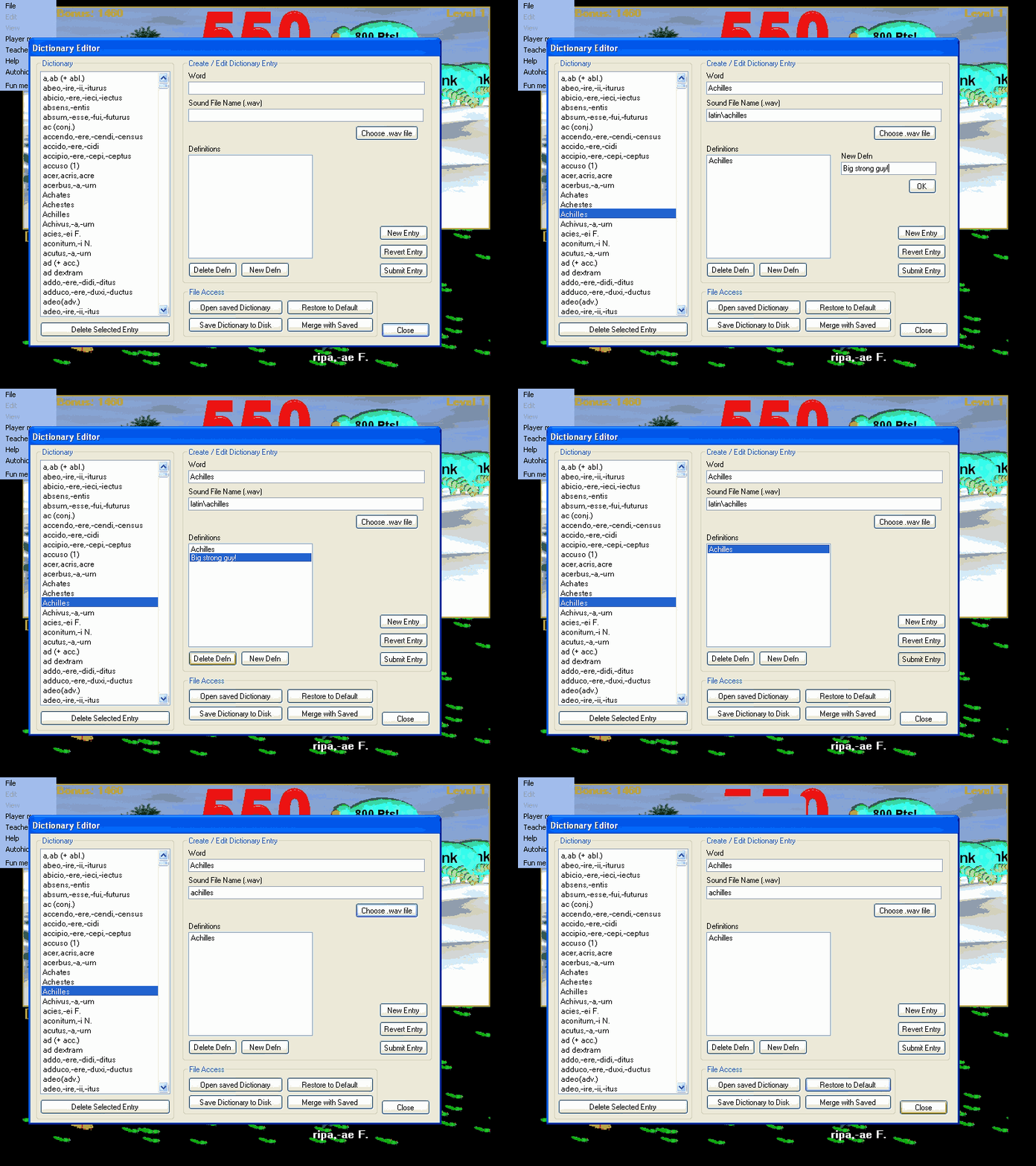
The above screen capture sequence shows the Hungry Frog French Teacher Menu Dictionary Editor sequence for the 'Achilles' French dictionary word being viewed, followed by a new definition being added, followed by the new definition being verified as having been added, next the new definition being deleted, then restored by reversion to the previous entry, then finally a user defined sound file being selected from the file browser which the game will speak aloud whenever the French language word is assigned to a frog in the course of game play. For the Hungry Frog French language game and any of the other Hungry Frog language software programs, it is a great benefit to teaching or homeschooling French language pronunciation to use this feature for all your French language words and French language phrases. If you add a new French word to the dictionary or a new French phrase, we recommend that you record your own sound recording to hear the French pronunciation during the course of game play. It will make your French homeschooling go much faster, and will live up your classrooms to hear the French pronunciation going on during game play.
Each step is described in complete detail below.
Hungryfrog Education Software
|
Hungryfrog User Community Participate in the Hungry Frog Education Software User Community to share your lessons and ideas with others and to report program bugs and suggest improvements to the PC computer software and the free Java applets at the web site. |
This is the simplest group box of the several displayed in the Dictionary manager.
'Dictionary' word list - the list of words in the currently open dictionary.
'Delete Selected Entry' control button - control button to delete the selected dictionary word or phrase and its English definition(s).
Clicking on any word in the dictionary expands it's data to fill the 'Create / Edit Dictionary Entry' fields (see Create / Edit Dictionary Entry).
French Dictionary Viewing a dictionary entry and the English definition list:

The File Access box has controls to allow you to interact with saved French language dictionaries on your computer.
The 'Open saved Dictionary' control button - brings up a file open dialog to open a saved '.frog' dictionary file to replace the current one.
The 'Save Dictionary to Disk' control button - brings up a save dialog to save the current dictionary to disk as a '.frog' dictionary file.
The 'Merge with Saved' control button - brings up an open dialog to open and then MERGE a saved '.frog' dictionary file with the current one.
NOTE: You can also merge dictionaries of different languages together, if you want to mix two languages together into one multi-lingual dictionary. There are better alternatives to this, however, as word spellings may overlap or you may encounter other confusing problems. If you want to mix languages together in lessons it is much safer to add words from TWO separate language dictionaries into a single mixed language lesson using the French Lesson Planner rather than creating a mixed language dictionary. In short, if you want to practice the French language and the French language mixed together, keep your French language dictionary and French dictionaries completely separate from one another but create mixed French language / French language lessons which comingle vocabulary selections for study lessons in the two languages together. This can be fun particulary if you homeschool French and Homeric Greek, for example, practice your homeschool French lessons separately and then for fun mix the Homeric Greek lesson up into the French language lesson. It is better suited for homeschool French courses where you have more direct control over French study content and are more likely to be simultaneously homeschooling French as well as other languages at the same time. Of course, it works when you study French in a school classroom setting as well!
French dictionary Open saved Dictionary:

French Dictionary being edited with a new English definition being defined for Achilles:
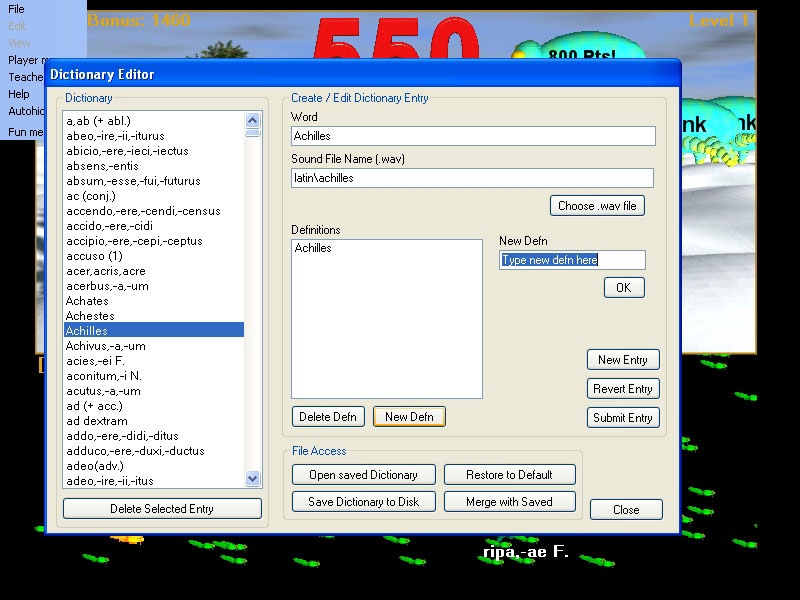
This is the most complicated group of controls.
The 'Word' textbox - shows the dictionary word or phrase for the selected entry.
The 'Sound File Name (.wav)' - shows the filename of the .wav sound file which will be spoken aloud for a frog which represents the dictionary entry.
The 'Choose .wav file' button - opens a file open dialog to let you select any .wav sound file to be spoken aloud by the frog which represents the dictioary entry.
The 'Definitions' list box - shows the list of current and/or pending English definitions for the currently edited entry.
The 'Delete Defn' button - deletes the selected English definition from the English Definitions box.
The 'New Defn' button - opens up the hidden text field 'New Defn' and also shows the corresponding 'OK' button.
The 'New Defn' text field pop up - appears when you create a new English definition by hitting the 'New Defn' button.
The 'OK' button for the 'New Defn' text field - confirms the English definition you are creating.
The 'New Entry' button - creates a new blank dictionary entry for you to edit.
The 'Revert Entry' button - reverts the dictionary entry you are editing to the last 'submitted' state.
The 'Submit Entry' button - saves changes permanently in the current dictionary.
IMPORTANT: The 'Word' can in fact be any French language word or phrase (or any other language word or phrase). Shorter gives more space to display under frogs, but the game will scale the game world to accomodate large word lengths. Use your own judgement when creating very long French language phrases. If you play with few frogs at a time, they can be very long and still quite legible.
IMPORTANT: The English definition is equally flexible It is not limited to just one word. Nor in fact does it need to be an English defintion for a French language word or phrase. You could just as easily teach French language to Spanish definitions as you can teach or homeschool French language to English definitions. The text must fit legibly on a bug, but otherwise it can be anything you like.
IMPORTANT: When you pick a .wav file to be spoken aloud for a dictionary entry when it becomes a frog, use the 'Choose .wav file' button to select the desired sound file. It will then be copied by the Hungry Frog software program automatically for you into your 'mySounds' folder in your 'HungryFrog' folder in your 'My Documents' folder. You can edit the sound file names directly by typing into the 'Sound File name (.wav)' text box, but if you make an error you may not catch it so that is more for expert users only.
Achilles is on the way to a new French dictionary definition:
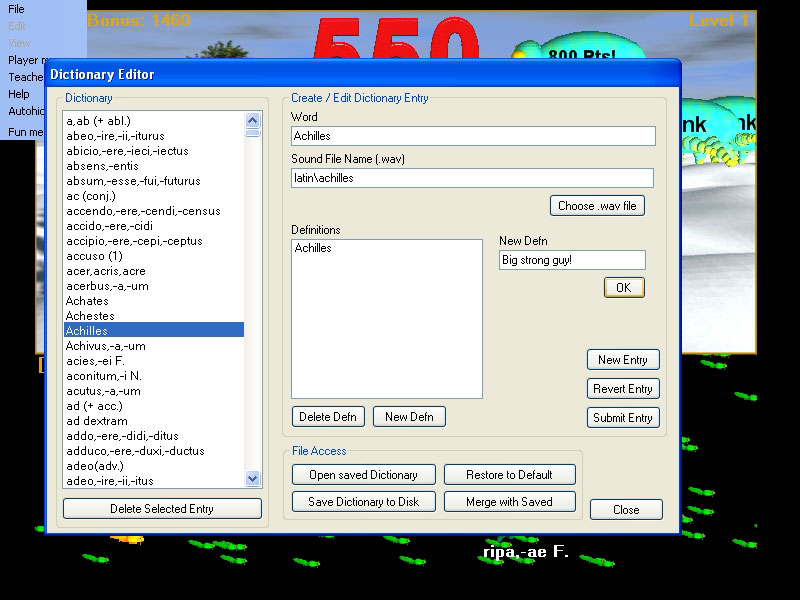
There is now a new French dictionary English definition pending for Achilles (the phrase 'Big strong guy!'). If you were to press the 'OK' button now, you would add the new English definition you just created to the list of Achilles' definitions.
New French dictionary English definition for Achilles has been added:

Now if you press the 'Submit Entry' button, you will save the changes to the Achilles dictionary entry into the opened dictionary shown in the list box. If you decide in actuality that Achilles is not that big and strong, then you can press the 'Revert Entry' button and your changes will be erased, and the dictionary entry will immediately revert to the last submitted entry (in this case the entry with just Achilles' name as his dictionary English definition).
Now we want to add our own spoken version of Achilles' name to replace the game's internal Achilles spoken name as we want to shout it very loud with our own very special French pronunciation. We press the 'Choose .wav file' button and navigate to our own personal sound recording that we saved from our sound editor as a .wav file.
French dictionary definition for French language study word Achilles choosing .wav file to be spoken aloud:
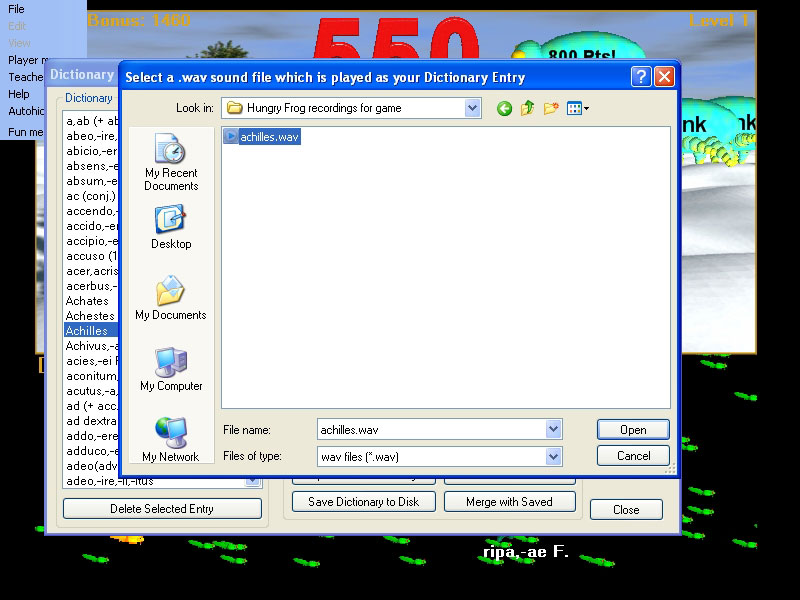
We had already recorded and saved our own sound file named 'achilles.wav' in our folder of sounds called "Hungry Frog recordings for game' and we navigated to that file using the file open dialog and chose that file to open (which in this case is the only file in the foler). We pressed the 'Open' button and the file. The sound file we chose is played aloud for us so we have a chance to hear it and guage our French pronunciation skills. It replaces the currently selected .wav file for Achilles' French language pronunciation, and our new sound file is automatically copied into our 'mySounds' folder in our 'HungryFrog' folder in our 'My Documents' folder on our computer.
French dictionary definition for Achilles is now updated with new .wav sound file recorded:
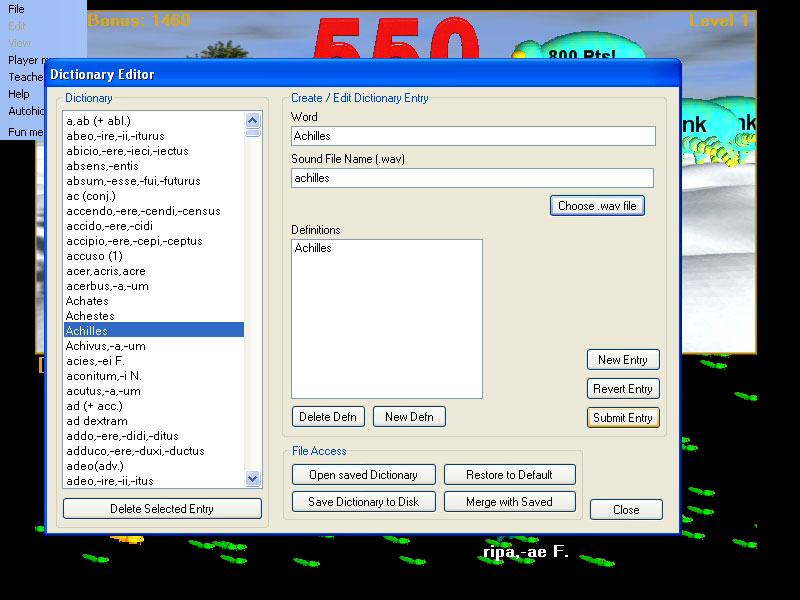
Finally, to end the example, we have decided that we made a lot of changes to the built-in dictionary that were all wrong and we want to just to back to the starting dictionary built into the game itself. We click the 'Restore to Default' button. This brings up a dialog warning us that we will lose any changes we have made to the current working dictionary. If we are worried that we really do like our changes, we should 'Cancel' and 'Save Dictionary to Disk' as a precaution before doing the restore to default command. As a general rule, it can never hurt to save your working dictionary file. You can always delete your archived files if you want to at a later date, and it will save you headache if you want to return to a dictionary you may have altered or deleted. Keep your homeschool French virtual library full of saved .frog dictionaries!
Restore dictionary to default:

We are satisfied that we really to want to revert completely, and press 'OK' to get to the next step.
You are now presented with a choice of built-in dictionaries that are part of the game program itself as back up resources outside of any that you have archived or saved to disk yourself. These are part of the program, and you can rely on them to always be available to you. Depending upon what language software programs you have purchased, you may have more than one from which to choose and/or more than one language from which to choose. In the example, you have a French dictionary and a French dictionary available.
French French Dictionary picker:
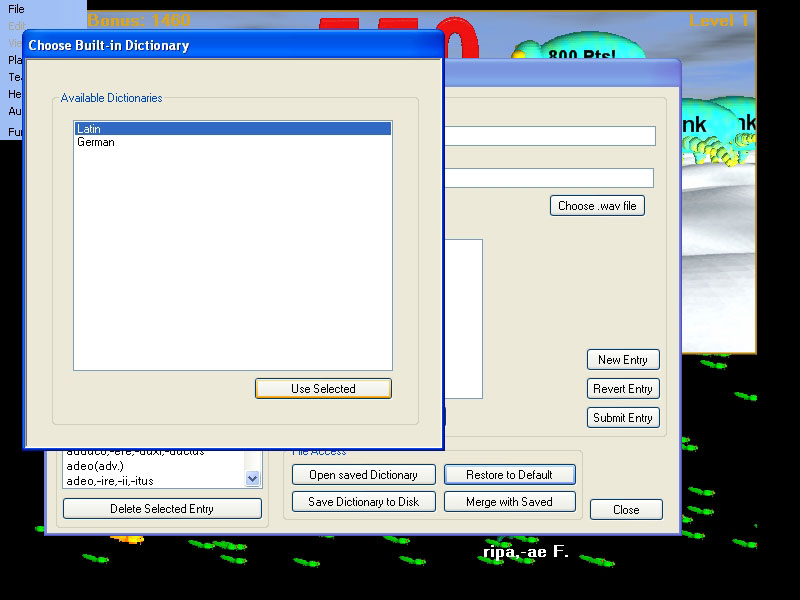
Select whichever dictionary you want, and it replaces the current dictionary. Make any changes, and save to disk often!